
12. Trade and storage
As you build a world to explore and interact with, adding item stores is something you'll want to do sooner or later. Add a locker here, a chest there, and a store in the centre of a small village. Both storage and trade in StoryScript are handled by trade, where storage is a special form of trading where prices are zero and items can thus be moved to and from storage without changing anything else. Trade can be added in two forms: either on a person (see tutorial 11) or on a location (see tutorial 8). The syntax is the same, and the way it works as well but for a few small differences.
As an example, we'll add a personal closet to a new Library location, which has some items you can pick up there. You can also put items back in. This will demonstrate the basics of trading. Create the new location, and use the ssTrade code snippet to add a new trade to the location's trade array. Modify it like this:
trade: [{
	name: 'Your personal closet',
	text: 'Do you want to take something out of your closet or put it back in?',
	buy: {
		text: 'Take out of closet',
		emptyText: 'The closet is empty',
		itemSelector: (game: IGame, item: IItem) => {
			return item.value !== undefined;
		},
		maxItems: 5,
		priceModifier: 0
	},
	sell: {
		text: 'Put back in closet',
		emptyText: 'You have nothing to put in the your closet',
		itemSelector: (game: IGame, item: IItem) => {
			return item.value !== undefined;
		},
		maxItems: 5,
		priceModifier: (game: IGame) => {
			return 0;
		}
	}
}]
Note that the priceModifier is optional and not part of the snippet, you can easily add the property yourself using your IDE's code completion.
Go to the library. You should see a button with the title specified in the trade code, and when you press it you should see the trade screen:
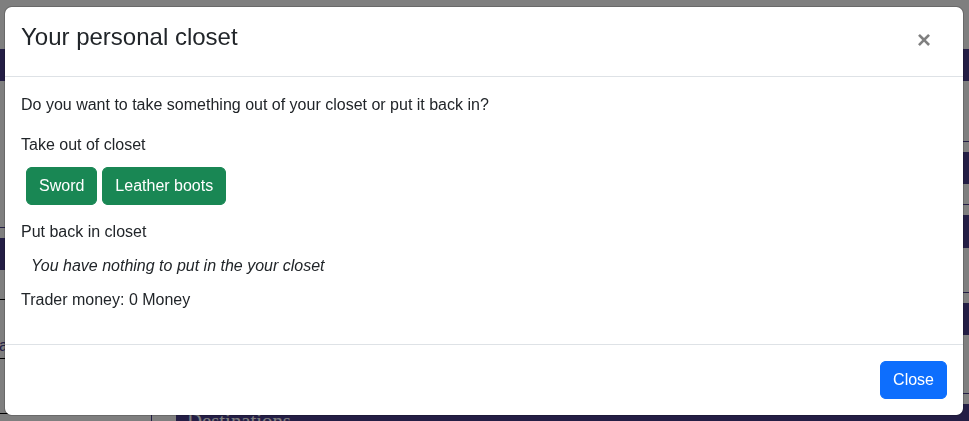
Ok, let's explore the options that are not obvious. First, you have both a buy and a sell side to the trade. This is defined from the perspective of the user, so the sell part is about the player 'selling' stuff to the trade object (in this case just putting his gear in the closet). Apart from the maxItems property, which determines the number of items available for buying or selling during one visit, both buy and sell have two important properties:
- itemSelector. This is a function that returns the items that can be bought from the trader or sold to him, her or it. In this example, the items available for taking from the closet are all items in the game that have a value property. That's why the sword and the leather boots show up and not the basement key. The buy item selector by default will select from all the items you defined for your game. The sell item selector selects items only from your character's inventory, and will not include equipped items.
- priceModifier: this can either be a number or a function that returns a number that will be multiplied by the item's value. For example, if you want the player to pay twice the value of an item to a trader in order to buy it, the number should be 2. In this example, the number on both sides is 0 because we want to put things in and take them out of the closet without paying any money.
Apart from a storage object or a store, you can also put the trade code on a person in order to be able to trade with that person. Let's enable trading with Joe by adding some code to the Friend.js file:
trade: {
	ownItemsOnly: true,
	buy: {
		text: 'I\'m willing to part with these items...',
		emptyText: 'I have nothing left to sell to you...',
		itemSelector: (_: IGame, item: IItem) => {
			return item.value !== undefined;
		},
		maxItems: 5
	},
	sell: {
		text: 'These items look good, I\'d like to buy them from you',
		emptyText: 'You have nothing left that I\'m interested in',
		itemSelector: (_: IGame, item: IItem) => {
			return item.value !== undefined;
		},
		maxItems: 5
	}
}
Note that for a person, the trade property is a single trade object, not an array of trade objects.
As you can see, I omitted the priceModifier here. That means Joe will buy and sell items for precisely their value. Now you have the option to trade with Joe as well as to talk to him.
Some last things of note on trading:
- currency. This will tell how much currency the trader has available for trading. NOTE: When trading with a person, the person's currency value is used. Traders can buy only as long as they have the money to pay for items that you have to offer. When you buy from them, the money you pay them will replenish their coffers.
- InitCollection: this is a function that is called before creating the list of items the trader has for sale. It returns true or false. If true is returned, the list of items for sale is refreshed. If not, the items that were on sale earlier will stay. If, for example, you want the trader's stock to be replenished based on some event, use this function to check whether the event has occurred and then return true for the list to be reinitialized.
- ownItemsOnly: this flag determines whether the itemSelector function will be applied to the items available in the game or the items in the trader's inventory. This way, you can allow the trader to sell only from his own gear and nothing else.